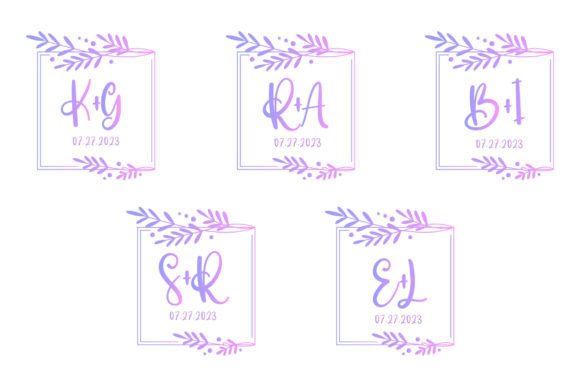
Elegant Monogram Wedding Border Set: A Designer's Guide
There’s a specific kind of magic in wedding stationery—it’s where formality meets personal expression. As a designer, I’m always searching for assets that can bridge that gap without hours of custom illustration. That’s exactly what I found with the Monogram Wedding Border Set. This isn't just a decorative frame; it's a complete design system. The intricate detailing of the border, combined with a clear central space for monograms, creates an immediate sense of heritage and sophistication. It feels timeless, yet clean enough for modern applications. Whether you're crafting a suite of invitations or branding a boutique event planning service, this set provides a foundational visual element that communicates elegance from the first glance.
More Than Just a Pretty Frame: Practical Applications Across Media
The true value of a design asset like this lies in its versatility. The provided files—AI, SVG, transparent PNG, JPG, and EPS—ensure you're not locked into a single platform. This is crucial for maintaining visual consistency across a client's entire brand ecosystem. Let’s break down where this Monogram Wedding Border Set truly shines.
For print and physical merchandise, the applications are immediate. Think beyond standard invitations. Use the border to design elegant save-the-date cards, RSVP inserts, or menu layouts. The design scales beautifully for posters announcing a wedding event or for creating custom stickers for favor boxes. The high-resolution canvas (1920px x 1280px) ensures crisp output, which is non-negotiable for professional print jobs. Small business owners in the wedding niche can leverage this for creating branded tote bags or packaging for artisanal gifts, adding a premium touch that elevates the perceived value of the product.
In the digital realm, its utility is equally powerful. The transparent PNG is a game-changer for social media graphics. Imagine Instagram story announcements or Facebook event headers framed by this elegant border—it instantly creates a cohesive visual theme. For web design, it can serve as a stunning section divider on a wedding blog or as the cornerstone of a logo design for a related business. The vector files (AI, SVG, EPS) are perfect for this, as they allow for infinite scaling without quality loss, ensuring your design looks sharp on retina displays and large monitors alike.
Integrating Elegance into Your Brand Identity
For entrepreneurs and content creators, branding is about creating a recognizable and trustworthy visual language. This Monogram Wedding Border Set offers a shortcut to establishing a brand identity rooted in classic elegance. It’s not just a decorative element; it’s a strategic tool.
Consider using the border as a consistent frame for all your marketing assets. Your email newsletter header, your PDF guide covers, and your digital product mockups can all share this common visual thread. This builds brand recognition far more effectively than a scattered collection of unrelated graphics. The monogram space itself is perfect for personalization—swap out initials for clients, event names, or even a simplified version of your own logo to create custom materials on the fly.
When thinking about typography pairings, this ornate border pairs best with clean, readable fonts. A simple sans-serif for body copy or a classic serif for headings will let the border’s details stand out without creating visual competition. Avoid overly script or handwritten fonts for primary text, as they can become illegible when set against the intricate lines. The goal is readability and a professional presentation where every element has a clear role.
A Practical Workflow for Using This Design Asset
So, you've downloaded the set. How do you ensure you're using it effectively? Here’s a straightforward approach.
First, audit your project goals. Are you creating a one-time invitation or building a full brand suite? For a single project, the JPG or PNG might suffice. For a brand system that will be adapted and resized repeatedly, start with the vector files (AI or SVG). This gives you complete control to edit colors, adjust line weights, or isolate parts of the design if needed.
Next, test your font pairings early. Drop the border into your design software and experiment with different typefaces inside the monogram space and for surrounding text. Print a test sheet or view it on multiple screens. Does the text remain legible at small sizes, like on a sticker? Does the overall composition feel balanced? This step prevents costly revisions later.
Finally, clarify the licensing. Since this is a commercial font and design set, understanding the terms is essential for client work or products you intend to sell. Most premium assets like this come with a license that allows for broad commercial use, but it’s your responsibility to verify. This due diligence is a hallmark of a professional designer or business owner and protects both you and your clients.
In the end, the Monogram Wedding Border Set is more than a collection of files. It’s a catalyst for creating designs that feel both personal and polished. It solves a real problem for anyone working in the wedding, event, or luxury goods space by providing a high-quality, adaptable foundation. By focusing on strategic integration rather than just decoration, you can leverage this asset to build stronger visual identities, streamline your workflow, and deliver work that truly resonates with an audience seeking beauty and sophistication.